02Team project, Uppsala University, 2026
Streamer Simulator
A rhythm game you play with your body, in front of a webcam. Hit the poses to grow your stream’s audience, and keep its chat in check.
- My part
- Programming, game design and motion tracking, shared with the team’s other programmer. My contribution focused on gameplay programming and motion-driven input
- Team
- Seven: art, animation, UI, sound, production and two programmers
- Play
- One player, in front of a webcam
- Built with
- Unity · C# · webcam body and hand tracking
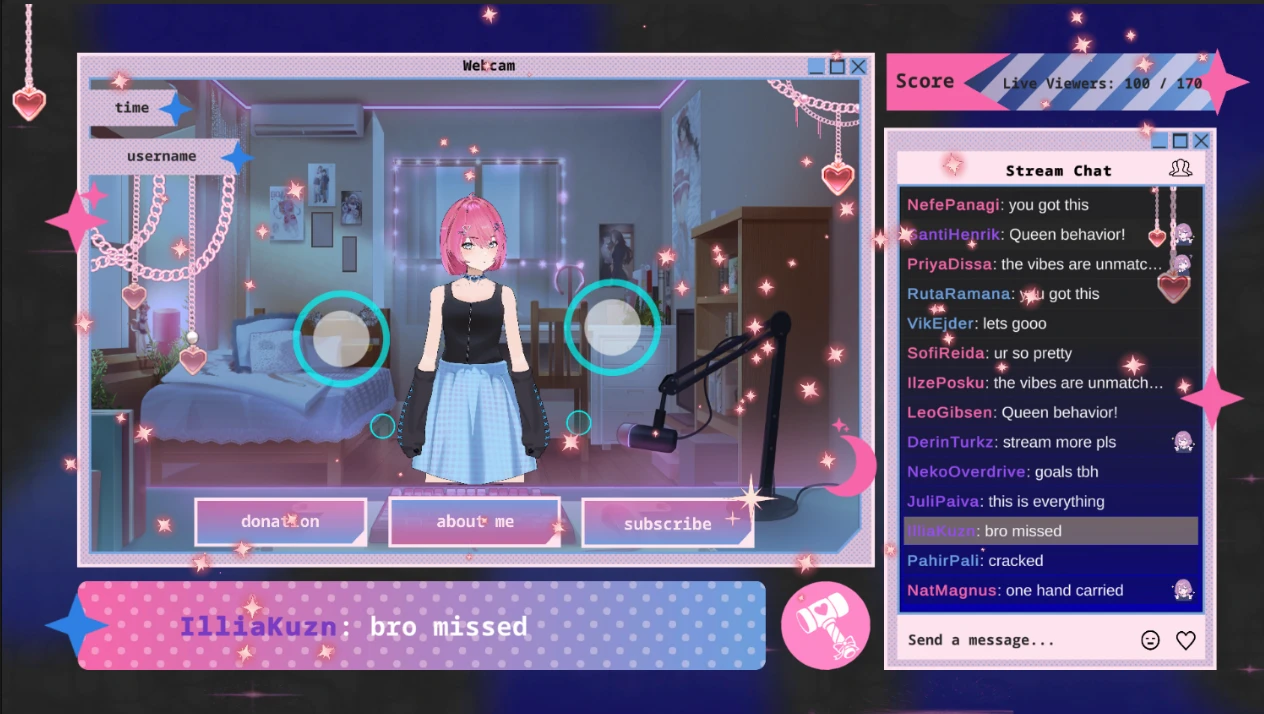
The game
Keep the rhythm and run the chat, both at once.
You’re a small streamer. Move your hands into the circles on screen to hit each pose, and watch the highlighted comment: if it’s a troll, swing your arm to ban it. Reach your follower goal to win. Miss too many poses, or let the chat run wild, and you lose.
- Pose circlesOne for each hand. Both hands in: +10 followers. One: +5. Neither: −5.
- The highlighted commentIf it’s bad, swing your arm to ban it. Letting a bad one through, or banning a good one, costs followers.
- Your audienceIt grows as you play well. Reach the follower goal to win.
- Stream chatThe simulated livestream chat, scrolling as you play.
Input
Your body is the controller.
The game reads you through an ordinary webcam. That is a very different kind of input from a keyboard.
A key
Down or up. Exact, instant, and the same every time.
A tracked hand
A position the tracker estimates from the camera image, frame after frame. It shifts a little even when you hold still, it can be lost for a moment, and some readings are less certain than others.
So tracking can’t go straight into the game the way a key press does. It passes through a few steps first.
- Webcamthe player, in front of an ordinary camera
- Trackingbody and hand positions, and how sure the tracker is of each
- Cleanupcalibration, smoothing and confidence thresholds
- Game inputposes, grips and gestures
- The gamecircles hit, comments banned, the UI
Technical detail: from tracking to game input
- Pose classification
- Turns tracked body positions into a pose, which feeds the rhythm game’s timing and scoring.
- Grip detection
- Reads from hand tracking whether a hand is gripping: an action on top of where the hand is.
- Gestures in the UI
- The same gestures that play the game also drive its UI.
Making it playable
Tracking is noisy. Three things steady it.
Webcam tracking can be noisy and inconsistent, so I added calibration, smoothing and confidence thresholds to make the input more stable and playable.
Calibration
Players, rooms and cameras all differ. Calibration sets the game up for the player in front of the camera, instead of assuming one size of person, distance or room.
Smoothing
Tracked positions shift from frame to frame, even when you hold still. Smoothing evens that out, so a steady hand reads as steady instead of flickering in and out of a circle.
Confidence thresholds
The tracker is surer of some readings than others. Readings below a confidence threshold aren’t trusted as input, so a hand the camera loses for a moment doesn’t count as a move.
Smoothing
Confidence
Each is a trade-off. More smoothing is steadier but slower to follow a quick move; a stricter threshold ignores more bad readings, and some good ones. The aim is input that feels stable and still responsive.
Who built what
This was a group project. I was one of its two programmers.
A team of seven students at Uppsala University, 2026. The team built the art, animation, UI, sound and music around the game; I worked on its programming, game design and motion tracking.
My contribution
Programming, game design and motion tracking
Shared with the team’s other programmer. My contribution focused on gameplay programming and motion-driven input: body pose and hand tracking as game input, and the calibration, smoothing and confidence thresholds that make it playable.
Unity and C#.
The team
Art and characters
Concept art, character design, illustration and animation.
The team
UI and game design
The UI, game design, the trailer, and the ban hammer.
The team
Sound and QA
Sound effects, music and QA.
The team
Production
Project management, Scrum and the builds.
Limits
What to know.
- Setup before play. Motion tracking needs a few extra downloads alongside the game, as its itch.io page explains.
- Not as exact as a key. Calibration, smoothing and thresholds make webcam input stable enough to play with; they can’t make it as precise as a key press.
- No public source. The code is in the course’s own repository, which isn’t public, so this page describes the work instead of linking to it.